Pick one photo
One adult, facing the camera, with both arms and the waist visible. A T-shirt works well.
 Bicep Heart AI.
A little flex. A lot of love.
Turn one photo into a 7-second bicep heart trend video with music—no filming needed. Made for creators who want to turn a portrait into the one-arm heart pose.
Make my bicep heart ↗Watch the real video sample ↗Adult portraits first. One-time video packs.
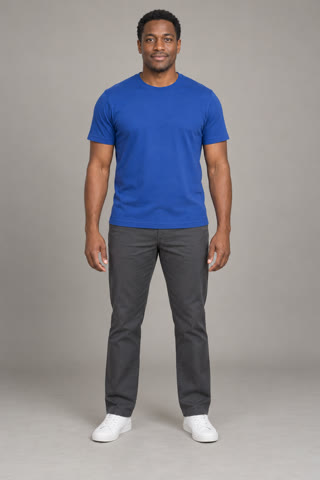 Made from this photo ↗
Generated from a fictional adult portrait, with music. Results and arm proportions can vary.
Choose one photo. About 7 seconds, vertical 480p, with music.
Watch the real video sample ↗One-time video packs. No subscription.
Choose a photo, then sign in. Payment comes before generation; buying a pack never starts a video.
7s · Private download for 7 days
Generated from a fictional adult portrait, with music. Results and arm proportions can vary.
One adult, facing the camera, with both arms and the waist visible. A T-shirt works well.
Continue with Google or your verified email. Your photo stays here while you check out.
Start your video, then watch and download the vertical MP4. Buying a pack never starts generation.
Choose one JPG, PNG, WebP or browser-supported HEIC portrait up to 40 MB. Large photos are prepared locally before upload; the upload remains limited to 10 MB. The output is a vertical MP4 in the 480p tier, about seven seconds long, with background music. No prompt or camera recording is required.
Choose one clear photo of a consenting adult, facing the camera, with the head, waist and both arms visible. An evenly lit face gives the model more useful information than a heavy beauty filter or a dark silhouette. Short sleeves help show where the hand meets the upper arm. Leave some space on each side so the raised elbow does not begin outside the frame.
The examples below use the same fictional portrait to demonstrate framing, not two different generation outcomes. The useful version leaves room for the shoulders and arms; the tight crop removes the very body parts needed for the movement. Also avoid a second person, crossed arms, a phone covering the face or objects held in both hands. Upload the original image when possible instead of a screenshot compressed several times.
Check your photo before paying. You can select it on this page before signing in, and the browser keeps the draft for the return journey on the same device. Changing browsers, clearing site data or using a private window can remove that local draft. A stronger input is a better starting point, but it does not guarantee perfect fingers, identical proportions or an exact facial expression.
The bicep heart trend turns a familiar gym flex into a small, playful message of affection. One arm bends to show the bicep; the opposite hand curls against the inside of that arm. The hand and the curve of the muscle complete a heart. The joke is the contrast between a strong-looking pose and a surprisingly sweet gesture, which makes it work as a reaction, a thank-you or a little message to someone you like.
Versions circulated on X before the pose spread through short videos on TikTok in late October 2026. Creators adapted it to their own expressions, framing and music, and replies invited other people to send a heart back. There is no verified single inventor in our research, so we do not assign ownership of the gesture to one account. The idea matters more than copying a particular performer: make the small heart readable, hold it for a moment and keep the expression your own.
Bicep Heart AI makes a short version from one photo, using a prepared movement reference. It is useful when you like the joke but would rather choose a portrait than record several takes. The result is generated media, rather than footage of you actually performing the move.
Think of the clip as a tiny setup and reveal. The opening establishes the person, the middle brings the arms into position, and the ending lets the viewer recognize the heart. The timings below describe the intended seven-second sequence; individual AI results can shift a beat or change how a hand settles against the arm.
When reviewing a result, watch the whole movement before judging the last frame. The face should stay recognizable as the arm rises, the crossing hand should belong to the same person, and the final outline should look like one small heart. A frame that looks good in isolation can still contain an awkward transition. Our sample lets you inspect the actual pacing before you choose a pack.
| Time | Intended movement |
|---|---|
| 0–2 seconds | Face the camera and settle into a relaxed expression. |
| 2–3 seconds | Bring one hand across the chest toward the opposite arm. |
| 3–4 seconds | Bend that opposite arm into a flex, keeping the fist near the head. |
| 4–7 seconds | Curve the crossing hand against the bicep and hold the heart for the reveal. |
To film it yourself, practice a comfortable one-arm flex in a mirror. Bring the opposite hand across your chest and curve it against the bicep to complete the little heart. Keep the phone near chest height, leave room around both elbows and pause for the reveal. For the AI version, start with a relaxed portrait with both arms visible; you do not need to perform the pose in your input photo.
how to do the bicep heart pose$4.99 / video
The single pack costs $4.99 for one video: one photo, the prepared bicep-heart movement, background music and a vertical MP4 in the 480p tier. There is no subscription. If you already want several separate clips, the three-video pack is $9.99 and the five-video pack is $14.99. Every completed video uses 100 credits, and the pack chooser shows the total before checkout.
Buy only the number of attempts you intend to use. Paying confirms your credit purchase; it does not start a video in the background. Return to the photo, check the permission box, and press Generate when you are ready. A confirmed technical generation failure releases reserved credits, while an uncertain provider response stays under review instead of starting a second paid request. Credit release and a refund to a bank card are different processes.
See one-time video packsCompare the gesture and the purchase unit as well as the headline price. A small heart against one bicep is different from an overhead heart made with both arms. Likewise, a credit-pack price is not the price of one finished video. The table records public information checked on November 3, 2026; competitor claims are not independent tests of their output or checkout.
Our single-video pack is a straightforward way to make one clip. A broader editor may suit you better if you want many unrelated templates or a different resolution. If a service offers a daily free clip, check its motion, duration and quality limits before assuming it matches this seven-second sequence. We have not purchased competitor videos for this comparison.
| Tool | Published price / purchase unit | Sign-in | Resolution | Music |
|---|---|---|---|---|
| Bicep Heart AI | $4.99 / 1 video | Upload first; sign in before checkout | 480p | Music included |
| MakeViral | Human template: 29 credits; smallest purchase $9.99 / 100 credits | Account credit balance; checkout not tested | 720p | Sound advertised |
| MoveFrame | Advertises 1 free daily clip; packs $9.90 / 100 credits | No sign-up advertised for free clip | 480p / 720p | Not stated on template page |
Swipe sideways to compare sign-in, resolution and music.
MoveFrame describes an overhead two-arm heart, a different gesture. Pack prices are not presented as per-video charges. MakeViral credit-pack source.
AI movement can vary in face likeness, finger shape and arm proportions. Review the whole clip, including the transition into the heart, before sharing. A clear portrait helps the model, but it cannot guarantee a particular expression or a perfect hand in every frame.
Use the sample for a personal greeting, a playful reaction or a short social post. Keep the heart visible when cropping for your chosen app. These are suggested uses; the homepage sample shows one generated result, not a promise that every upload will match it.
Your private history keeps completed videos available for seven days. Download the MP4 with music or choose Download without sound to get the same video frames without the audio track; the silent download uses no extra generation credits. Save a copy before the download expires.
Use only adult photos you have permission to upload. If a task is still running or under review, return to its existing progress page rather than submitting another job. Buying a video pack does not start generation automatically.
Have a billing question? Keep your order or task ID handy.
Contact us ↗Bend one arm to flex your bicep. Press the thumb and fingers of your other hand against it to complete a small heart. This is different from joining both hands over your head.
Use a clear photo of one consenting adult. Face the camera with your head, waist and both arms visible. Avoid group photos, crossed arms and tight face-only crops.
Yes. Background music is added after generation and included in the MP4 you preview and download.
No. The bicep heart action is prepared for you. You only choose a photo.
A confirmed technical failure releases reserved credits. An uncertain submission stays under review without submitting a second paid job. This is separate from a card refund.
Return with the same Google account or verify the same email. Your payment receipt email does not change account ownership. Open your history for videos or billing for orders.
Allow several minutes. Our first verified video took about seven minutes; waiting time can vary with provider load. Keep the task ID and check your history instead of submitting again.
$4.99 buys 1 video, $9.99 buys 3, and $14.99 buys 5. Each video uses 100 credits. Packs are one-time purchases in USD with no subscription. Outputs are MP4 videos with music, about 7 seconds long, in the vertical 480p tier.
Completed videos are available in your private history for seven days. Input uploads expire after 24 hours unless a running or uncertain task still needs them. Save the MP4 to your device before it expires.
Security verification is required for email sign-in and video generation. Complete the check before paying. If it keeps failing, try a different browser or network, or contact support with the error code. Your photo stays on this device while you check.
No. The curve of one arm and the placement of the other hand create the heart. Choose a clear portrait with enough room for both arms.
No. A bicep heart is small and sits against one flexed upper arm. An overhead heart uses both arms raised above the head.
Yes. On a completed MP4 result, choose Download without sound. It removes the audio without starting another generation or spending video credits.
Your turn to send a heart.